

In development · built and running on Odoo 19
The AI manufacturing planner for Odoo.
What runs short, when, why, and what to do about it.
One ranked queue of decisions, a cause on every exception, and options to buy, make, move or reschedule that it applies as drafts you can undo, never confirmed documents. Every number is computed from your own Odoo records. AI is optional and off by default.
An installed Odoo 19 module · Community and Enterprise · Odoo.sh or self-hosted · In development, with early access for a few design partners being prepared.
See it in under a minute
What runs short, and what to do about it.
The real Planner on a fictional sample plant: a shortage with its cause, the computed options, a draft RFQ applied and undone, Buy, a reschedule previewed, and Pulse.
Read the transcript
- What runs short. And what to do about it. Nanti Manufacturing Planner · Odoo 19 · in development.
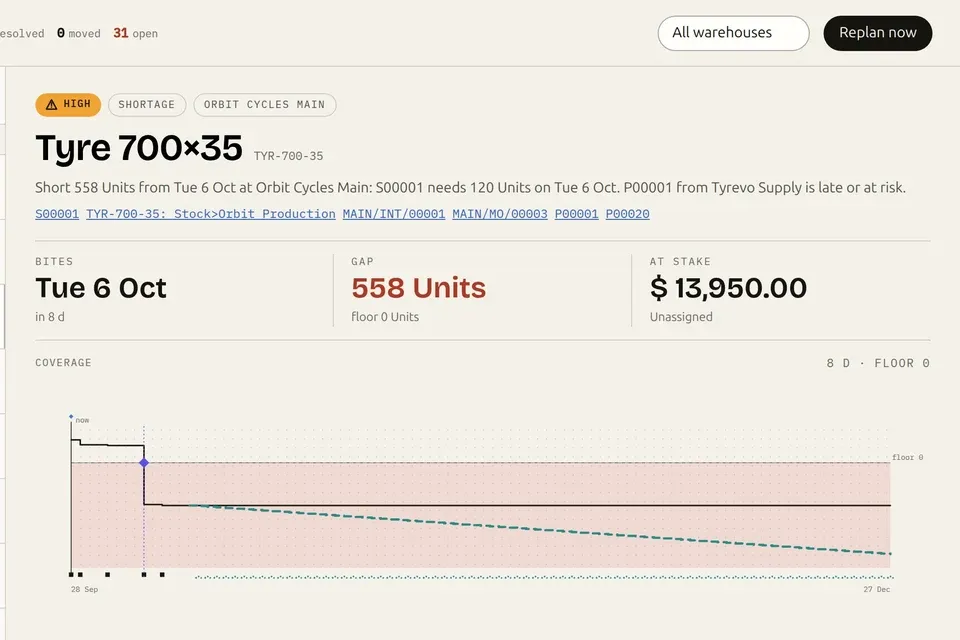
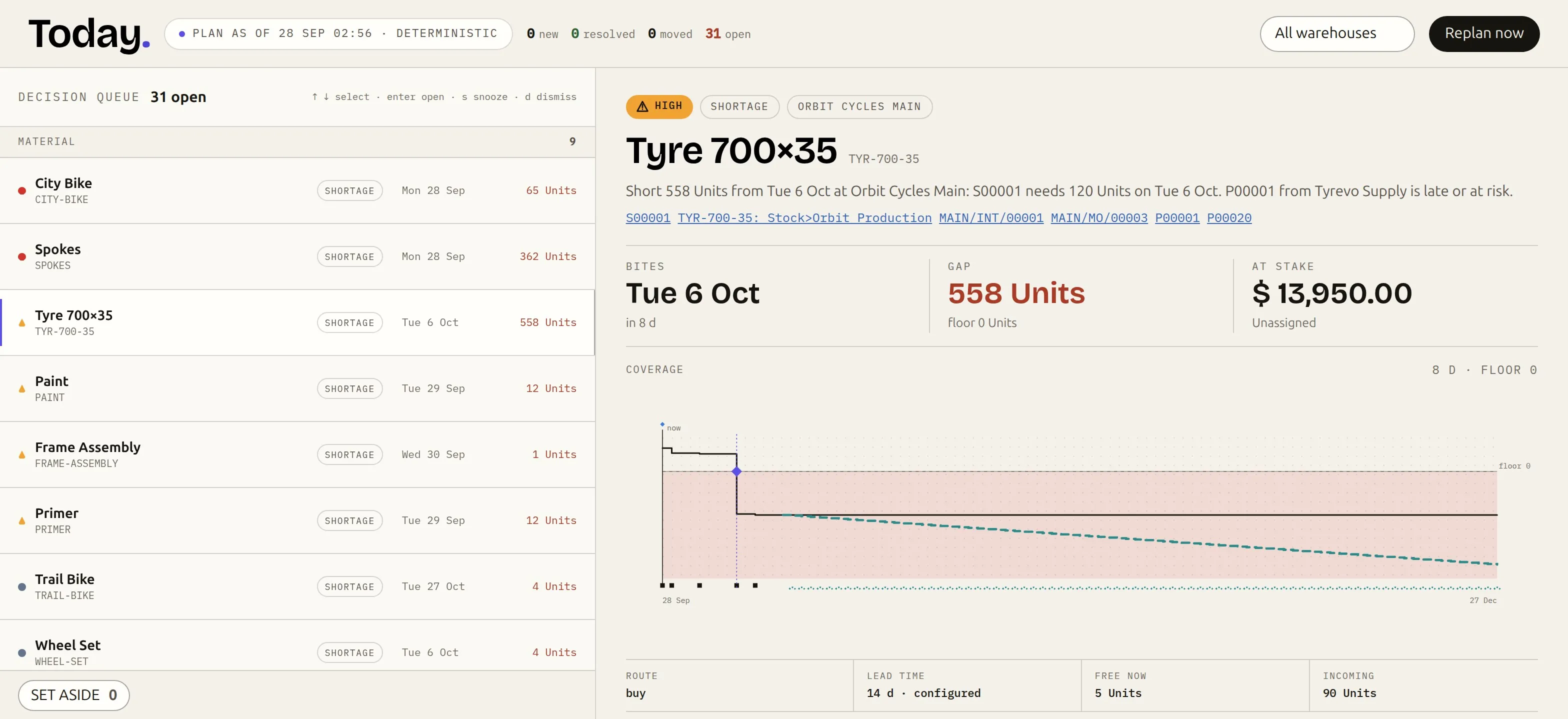
- One ranked queue: Short 558 units, and exactly why.
- Options, computed: Each names its constraint and the draft it would create.
- Apply: A draft RFQ. Never a confirmed one. Undo: Cancelled, and the option reopens.
- Buy: Every suggested purchase, by vendor, with order-by dates.
- Capacity: Move work. See every affected operation first.
- Pulse: On-time delivery, turns, cover, load. One review.
- Planning that looks ahead. Built and running on Odoo 19. Every number from your own records. nanti.ai/manufacturing-planner In development · Odoo 19 Community and Enterprise · drafts only, with undo · real product, demo data.
The morning problem
Your plan was right. Yesterday.
The scheduler ran at night. Then a truck slipped, a rush order landed, a work order ran long. By 9 a.m. the plan is history, and the real one lives in a spreadsheet and one planner’s head. Every morning starts with the same three questions:
- 01
What breaks first?
Which product drops below its floor, at which warehouse, on which day. Not a report to interpret: a date.
- 02
Why?
The sale that needs it, the purchase that is late, the order that cannot start. One sentence, linked to the documents.
- 03
What do we do about it?
Buy, make, move or reschedule. Options computed from your own records, applied as drafts you can undo.
Odoo already holds the answers: the orders, the stock, the BoMs, the calendars, the lead times. What is missing is the system that connects them into decisions, and keeps them connected as reality moves. That is the whole product.
Not a mockup
It sees the plant. Then it helps you decide.
In development does not mean imaginary. The planner is built, tested on Odoo 19 Community and Enterprise, and running on our test plant. Every screen on this page is a real capture of the current build.
- A ranked decision queue with a cause on every item
- Coverage day by day, per product per warehouse
- Capacity per work center against its calendar
- Learned lead times and a planning-data scanner
- Replanning within minutes of a change
- Options on every need: buy, make, move, reschedule, expedite
- Apply creates a draft, never a confirmed document
- Undo cancels it and reopens the option
- Buy grouped by vendor, Move between warehouses
- Reschedules previewed operation by operation
- 22exception types, each with its cause chain
- Daylevel coverage, per product, per warehouse
- Draftsnever confirmed documents, and every one undoable
- C + EOdoo 19 Community and Enterprise, Odoo.sh or self-hosted
Screen 01 · Today
One queue. Ranked by what it costs.
Every shortage, late supply, blocked order and data gap across your products and warehouses, in one queue ranked by urgency and value at stake. Each item says in one sentence why it exists, and links the exact sales, purchase and manufacturing documents behind it.
Screen 02 · Options
Every shortage comes with options.
Buy, make, move, reschedule or expedite, computed from your own records. Each option names what binds it and the exact draft it would create. Apply creates that draft, never a confirmed document, and Undo cancels it.
Screen 03 · Buy
Buy, grouped by vendor.
Every suggested purchase in one place: the need date, the date to order by, the quantity, the vendor’s observed lead time and on-time rate, price breaks and alternates. One click creates one draft RFQ per vendor.
Screen 04 · Coverage
Day by day, with the break date.
On hand plus scheduled supply minus scheduled demand, per product per warehouse, against the floor: the first day it breaks, the days of cover, and a forecast continuation in teal that never counts as confirmed.
Screen 05 · Grid
Weeks at a glance. Drafts never pass for confirmed.
Products by week, grouped by warehouse and category, coloured by health. Expand one to see confirmed demand, an editable rule-based forecast, confirmed supply, and open drafts, Odoo’s own draft RFQs included, marked “not yet confirmed” so nothing is ordered twice.
Screen 06 · Schedule
Capacity you can see. On Community too.
Load per work center per day against its working calendar, overloaded days flagged, and unplanned work drawn instead of dropped. Pick a new date for an order and see every affected operation before anything is written. Confirm writes the dates; Undo restores them.
Screen 07 · Health
The data that quietly breaks plans.
Missing BoMs, missing vendors, zero-quantity BoM lines, stale reorder rules, unit mismatches, missing lead times and unplanned work, found for you and grouped, each with a sentence on what it breaks. Where your receipts already know the real lead time, adopt it in one click.
Screen 08 · Pulse
One review for the manager.
On-time delivery, inventory turns, days of cover, open exceptions by severity, spend committed with what is overdue, the load on every work center for the next seven days, and the trend of open exceptions.
Every screen on this page is the real module, captured on 28 September 2026 from our Odoo 19 test plant, “Orbit Cycles”: a fictional bicycle maker with invented products, partners and documents. Nothing in the product was altered; the Odoo menu bar is cropped from the frames, and Pulse’s action log is cropped out.
What it catches
22 exception types. Each one says why.
Not a red cell to interpret. Every exception carries one sentence that names the cause and links the documents behind it, grouped the way the Today queue groups them.
- Shortage
- MOQ conflict
- Late supply
- Supply at risk
- Promise at risk
- Late MO
- Blocked MO
- Overload
- Excess
- Dead stock
- Expiring lot
- Missing lead time
- Missing vendor
- Missing BoM
- Zero BoM line
- Stale reorder rule
- Unit mismatch
- No calendar
- Unplanned work
- Stale draft
- Very old open supply
- Double replenishment
- Promise at risk
S00001 is committed for Tue 6 Oct, but the shortage behind it can first be covered on Wed 7 Oct.
- Blocked MO
MAIN/MO/00009 starts Fri 2 Oct with Spokes short by 120 Units.
- Overload
Final assembly is overloaded in this week: 24.00 load hours against 16.00 capacity hours.
- Unplanned work
MAIN/MO/00003 has operations with no planned date. Plan it so its work can be scheduled and counted.
Six exceptions in a minute
What goes wrong, and why.
A shortage, a promise at risk, a late purchase order, a blocked manufacturing order, excess stock, and a product with no bill of materials: each caught on the real Today cockpit, each with its cause.
Read the transcript
- Six things that go wrong in a plant. Each one with its cause · Nanti Manufacturing Planner.
- Shortage: Short 68 units, and the order that needs them.
- Promise at risk: The date we promised, and when we can cover it.
- Late supply: A purchase order, weeks late.
- Blocked manufacturing order: Starts Friday. The spokes aren't there.
- Excess: 5,000 reflectors above their limit.
- Bad data: missing BoM: Set to manufacture, with no bill of materials.
- Exception types · Each with its cause. Supply: shortage · late supply · supply at risk. Promises: promise at risk. Production: blocked MO · late MO · overload. Stock: excess · dead stock. Data: missing BoM · missing vendor · missing lead time · stale reorder rule.
- Planning that looks ahead. The deterministic core is built and running on Odoo 19. The AI layer is designed, not built. nanti.ai/manufacturing-planner In development · sample plant Orbit Cycles, fictional data · design partners wanted.
Your Odoo, your call
What it writes. What it never does.
With AI off, which is the default, the Planner writes only what a person applies, and every write is logged and undoable. It never confirms a document on its own.
- Apply creates a draft purchase order (RFQ), a draft manufacturing order or a draft internal transfer.
- Undo cancels a draft it created and reopens the option.
- Confirm on a reschedule writes the order’s and work orders’ planned dates, after a preview. Undo restores them.
- Adopt learned lead time (an administrator) writes the observed delay onto the vendor line.
- Snooze, assign, dismiss and reported blockers post notes and activities.
- Confirms a document on a planner’s click
- Invents a quantity, a date or a price with a language model
- Sends anything out with AI off
- Changes stock quantities
- Posts accounting entries
- Deletes your records
- Deterministic every figure computed from your records, never generated
- Opt-in per company nothing is computed until an administrator runs the first plan
- The plant’s own day “today” and nightly runs follow the plant’s time zone
- Staging-safe runs on an Odoo.sh staging copy, even with scheduled jobs off
- Server-side permissions enforced by the server, not by hiding buttons
- Append-only log every action, who did it, before and after
A day on the plan
Reality moves. Watch the plan answer.
Six things that happen in every plant, and exactly what the Planner does about each, with no AI involved.
The vendor slipped. The plan already knows.
A purchase line’s date passes with the receipt still open. The Planner flags the supply late, turns the product’s coverage short with the break date, and writes a cause that names both the sale demanding it and the late purchase order. If the vendor’s own history says deliveries run late, open purchases are flagged at risk before the date even passes.
Open the purchase order straight from the cause, or take a computed option, such as buying from a vendor who arrives earlier, applied as a draft RFQ you can undo.
Sales confirms. Minutes later, the plan has moved.
Confirming a sale order queues a replan of the products on it. About two minutes later, by default, their coverage, options and exceptions are recomputed inside the current plan, and the queue on Today redraws with the new reality ranked.
Nobody re-runs anything. The shortage, its cause and its options are already waiting.
The date you committed can no longer be met.
A committed sale whose date the plan can no longer cover is flagged “Promise at risk”, with the reason in one sentence: when it was promised, and when the shortage behind it can first be covered.
You see it before the customer calls, and fix the shortage behind it from the same screen.
More hours planned than the calendar holds.
Load is measured against each work center’s working calendar, per day. An overloaded week raises an exception with the hours, and the schedule marks the days in red under the lane.
Pick a new date for an order and preview the exact ripple on every operation. Confirm writes the dates through standard Odoo fields; Undo restores them. Moves inside the frozen horizon need a manager.
Due to start in days, components short.
The manufacturing order is flagged blocked with the component and the gap behind it. On the floor queue, an operator can report a blocker in one click, and it surfaces on Today.
The planner sees the block before the morning it happens, not during it.
The quiet numbers that poison every plan.
A buy product with no vendor, a manufactured product with no BoM, a vendor line with no lead time, a reorder rule that no longer matches demand. Health lists them grouped, each with a plain sentence on what it breaks.
Open the record and fix it, or adopt the learned lead time where your receipts already know better.
The honest comparison
Odoo plans. This makes the plan decidable.
Odoo 19 already ships reordering rules, the forecasted report, replenishment, and, on Enterprise, MPS and a planning Gantt. The Planner does not replace any of it. It is the decision layer on top.
The left column is Odoo doing its job, and we build on it, not against it. The right column is what the Planner adds, on the same records.
AI, on your terms
AI comes last. And it is optional.
The planner is complete with AI off, and AI is off by default. The contract is set before any AI ships: the engine computes every quantity, date and price; a model only chooses among the options the engine computed, and explains why.
The full planner, exactly as it runs on this page. Nothing leaves your server: the module makes no outbound calls.
A compact excerpt of one planning decision, the exception and the engine’s options, goes to the provider you pick: our hosted service, your own key, or a local model. The model never sets a number.
In development · not released
An AI employee for planning
It is being built to prepare decisions, draft documents and, inside limits a supervisor sets and only after earning trust, act on routine ones: Suggest, Prepare, Act, with a trust ladder and a pause switch. It chooses only among options the planning engine computed; it never sets a quantity, a date or a price.
Straight about status
Where this stands.
In development, with the planner built and running on Odoo 19. Nothing is available to customers yet. Here is the line between what is real today and what is not, exactly where it sits.
- The Today queue, 22 exception types with cause chains, day-level coverage per warehouse, and replanning within minutes of a change
- Computed options with Apply as drafts and Undo; Buy grouped by vendor; Move between warehouses; promises at risk
- The schedule with capacity per work center, reschedule previews, confirm and undo, and the floor queue
- The Grid with rule-based forecasting, learned lead times, Health, and Pulse
- Odoo 19 Community and Enterprise, Odoo.sh and self-hosted, English
- The AI employee: built, not released; AI stays off by default
- An approval step for drafts above a value, being finished on the screens
- Designed only: a chat panel, what-if scenarios, statistical forecasting, an automatic scheduler, and MCP tools through the Execution Layer for Odoo
- Pricing and an install path: announced with early access, which is being prepared with a few design partners
Plain answers
Asked, answered.
What is Nanti Manufacturing Planner?
A planning cockpit that installs inside Odoo 19 and reads your own records: BoMs, stock per warehouse, open sales, purchase and manufacturing orders, and work-center calendars. It shows what runs short and when, why, and the options to fix it, and applies the one you choose as a draft you can undo. It is in development, built and running on Odoo 19 Community and Enterprise, and built by nanti.ai.
Does it need AI to work?
No. The planner is a deterministic engine and works fully with AI off, which is the default. When AI is used, a model only chooses among the options the engine computed and explains the choice; it never produces a quantity, a date or a price. The numbers come from your data, never from the model.
What does it write into Odoo?
With AI off, which is the default, it writes only what a planner applies: draft purchase, manufacturing and transfer documents, reschedules you confirm, and vendor lead times an administrator adopts, all logged and undoable. It never confirms a document on its own, never changes stock quantities, never posts accounting entries, and never deletes your records.
Can it create purchase and manufacturing orders?
Yes, as drafts. When a planner clicks Apply on a computed option, it creates a draft RFQ, a draft manufacturing order or a draft internal transfer, and Buy creates one draft RFQ per vendor. It never confirms them, and Undo cancels a draft it created. Open drafts, including Odoo’s own draft RFQs, count as pending supply and are shown as not yet confirmed, so the same need is never proposed twice.
How is this different from Odoo reordering rules and MPS?
Odoo gives you the forecasted report per product and replenishment per reordering rule. The Planner gives one decision queue across products and warehouses, ranked by urgency and value at stake, where every item says in one sentence why it exists and links the documents behind it; a day-by-day balance with the break date; computed options that name their constraint and the draft they would create; and capacity per work center on Community too. It builds on Odoo’s planning rather than replacing it.
What exceptions does it catch?
22 exception types, each with a one-sentence cause and links to the documents behind it: shortage and MOQ conflict; late supply, supply at risk and promise at risk; late and blocked manufacturing orders; overload; excess, dead stock and expiring lots; and planning-data problems such as a missing lead time, vendor or BoM, a zero BoM line, a stale reorder rule, a unit mismatch, a work center with no calendar, unplanned work, a stale draft, very old open supply and double replenishment.
Does it plan against real capacity?
It shows the load on each work center per day against its working calendar, flags overloaded days, and draws unplanned or overdue work instead of dropping it. You can move an order and preview every affected operation before anything is written, then confirm or undo. It does not schedule or level capacity by itself; an automatic scheduler is designed, not built.
How fast does it react to a change?
Confirming an order, changing a purchase date, validating a receipt, finishing a manufacturing order, adjusting stock, or editing a BoM, reorder rule or vendor lead time queues a replan of the affected products. After a short delay, two minutes by default, they are recomputed inside the current plan. A full plan runs nightly and on demand.
What are learned lead times?
From your received purchase lines the Planner computes each vendor’s typical and conservative receipt delay and on-time rate, shows them next to the configured lead time, flags open purchases likely to slip, and lets an administrator adopt the observed value in one click.
Does it forecast demand?
Yes, with named rule-based methods you set per product or category and per warehouse: moving average, same period last year, weekly profile and growth factor. Forecast rows are labelled, editable per week in the Grid, consumed by confirmed demand, and scored against what actually happened. Confirmed demand always wins. It does not do statistical forecasting.
Which Odoo versions and editions does it support?
Odoo 19, Community and Enterprise, on Odoo.sh or self-hosted, including an Odoo.sh staging copy where scheduled jobs are switched off. It needs the Community apps Manufacturing, Inventory, Purchase and Sales. Odoo Online cannot install third-party modules. The interface is in English today.
Will AI run my plant on its own?
No. An AI employee for planning is in development and not released. It is being built to prepare decisions, draft documents and, inside limits a supervisor sets and only after earning trust, act on routine ones, choosing only among options the planning engine computed. AI stays off by default, and the planner is complete without it.
Does my data leave my server?
With AI off, which is the default, no: the module makes no outbound calls. If AI is turned on, a compact excerpt of one planning decision, the exception and the engine’s options, goes to the provider you choose: our hosted service, your own key, or a local model. We do not train models on your business data.
Can I use it from Claude or ChatGPT?
Not yet. Publishing the Planner’s functions as MCP tools through the Execution Layer for Odoo is designed, not built.
How do I get it, and what does it cost?
It is not available yet. Early access with a few design partners, on their own staging databases, is being prepared, and pricing is announced with it. If you run manufacturing on Odoo 19, write to hello@nanti.ai.
Early access
Plan with us first.
We are preparing early access with a few manufacturers on Odoo 19, on their own staging databases. If you run manufacturing on Odoo 19, write to us: design partners get the first deployments and a real say in what the planner learns next. Or follow the build, and we write when something real opens.
One list, real milestones only. No newsletters, no spam.