

Odoo 20 · licensing · checked 24 September 2026
What is a Light User in Odoo 20?
The biggest change in Odoo 20 is not a feature. It is who can afford a login: the picker, the cashier, the shift worker, and every employee who only needs their own time off, expenses, and attendance.
The short answer
A Light User is Odoo 20’s lower-priced user role for people who use Odoo for their own work, not to run sales, purchasing, projects, or accounting. It sits beside User and Administrator on every user form. And under Odoo’s updated Enterprise Agreement, every active employee without a login counts as one.
Why it matters
The whole workforce can have a login now.
Until Odoo 20, every internal login counted as a full User, so a login for a warehouse picker cost the same as a login for the head of sales. A Light User gives the people who only need their own slice of Odoo an account of their own, at a fraction of the price.
Full User Light User
- Salesperson User
- Accountant User
- Buyer User
- Warehouse picker Light User
- Warehouse picker Light User
- Cashier Light User
- Cashier Light User
- Shift worker Light User
- Shift worker Light User
- Employee, self-service Light User
- Employee, self-service Light User
- Employee, self-service Light User
An illustrative team, not a customer. The Light roles are the jobs Odoo’s pricing page names for Light Users.
What Odoo’s pricing page showed, viewed from India on 24 September 2026
Bars compare the Light price with the lowest Standard figure shown. Prices differ by country and billing period, and Odoo sells Light User licences through an Odoo Advisor, by quote.
In Odoo’s own words
What a Light User can do.
Odoo’s pricing page describes a Light User as “a cost-effective license that serves two distinct roles”: an employee who exists only as an HR record with no login, and “a user with limited access … strictly tailored to essential Employee features.”
- HR and personal Manage personal profiles, leave requests, expense reports, referrals, appraisals, meal tracking, and attendance.
- Planning View planning and manage worksheets.
- Point of Sale Connect as an employee in a PoS session.
- Knowledge Read-only access to the Knowledge app.
- Warehouse Barcode scanning operations, without rights to create products or manage inventory.
No access to
- Sales
- Purchase
- Project
- Accounting
- Advanced features reserved for Standard or Custom users
Source: odoo.com/pricing, “What is a Light User?”, 24 September 2026.
And what the Odoo 20 code allows
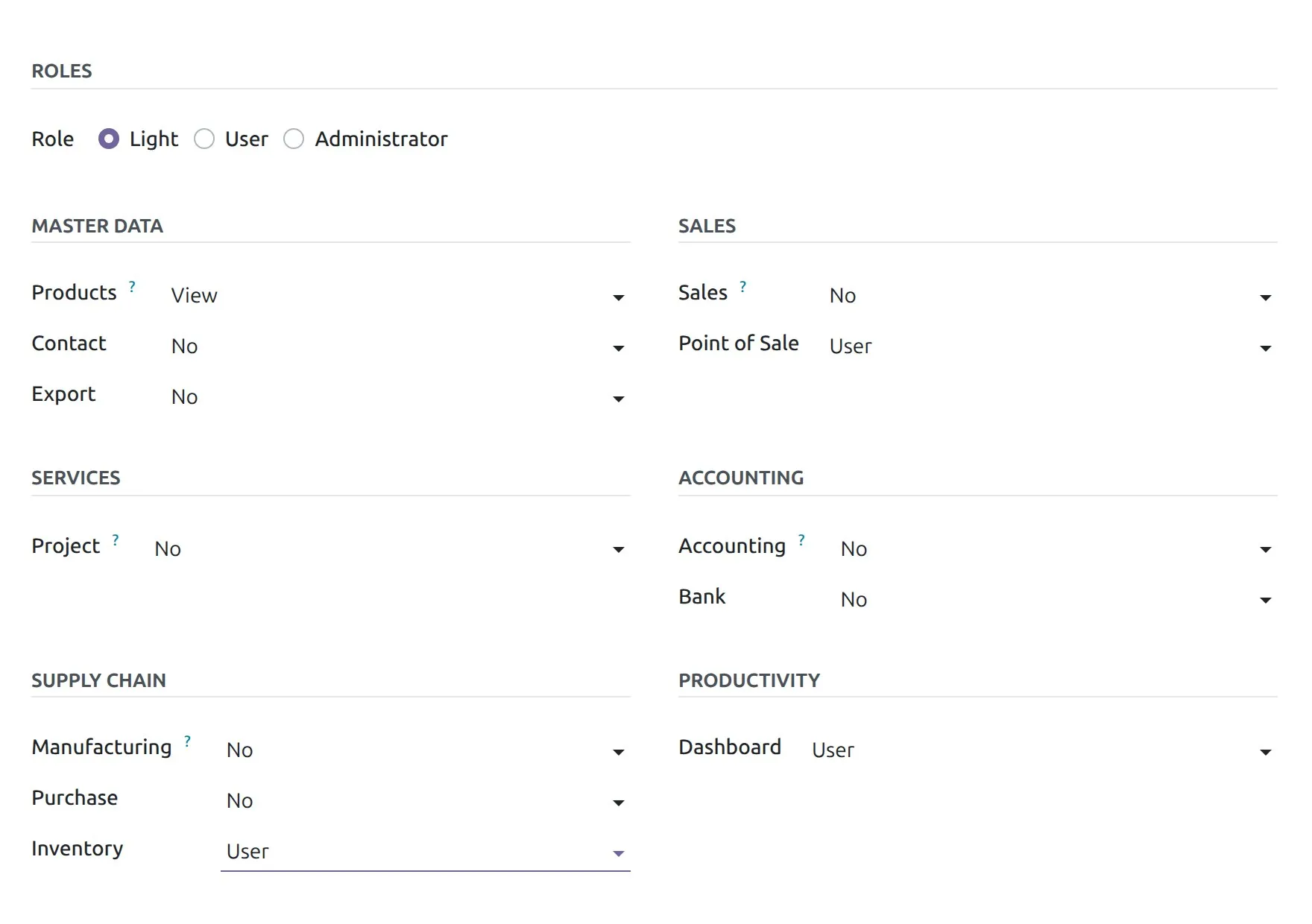
The software decides which access rights keep a user Light: each app declares its “light groups”, and anything outside them makes the user a full User. In the Odoo 20 Community source, the light rights include:
- InventoryUser
- ManufacturingUser
- Point of SaleUser
- Time OffEmployee
- AttendancesOwn records
- LunchUser
Not light: Sales, Purchase, Accounting, Project, CRM, and every other user right an app does not declare.
Note the gap: the pricing page limits warehouse work to barcode scanning, while the code lets a Light user be an Inventory User. Ask your Odoo Advisor before you rely on the generous reading.
Watch this before you save
One dropdown turns a Light User into a full User.
Odoo 20 does not store the role as a label you set once. It works it out from the access rights, every time.
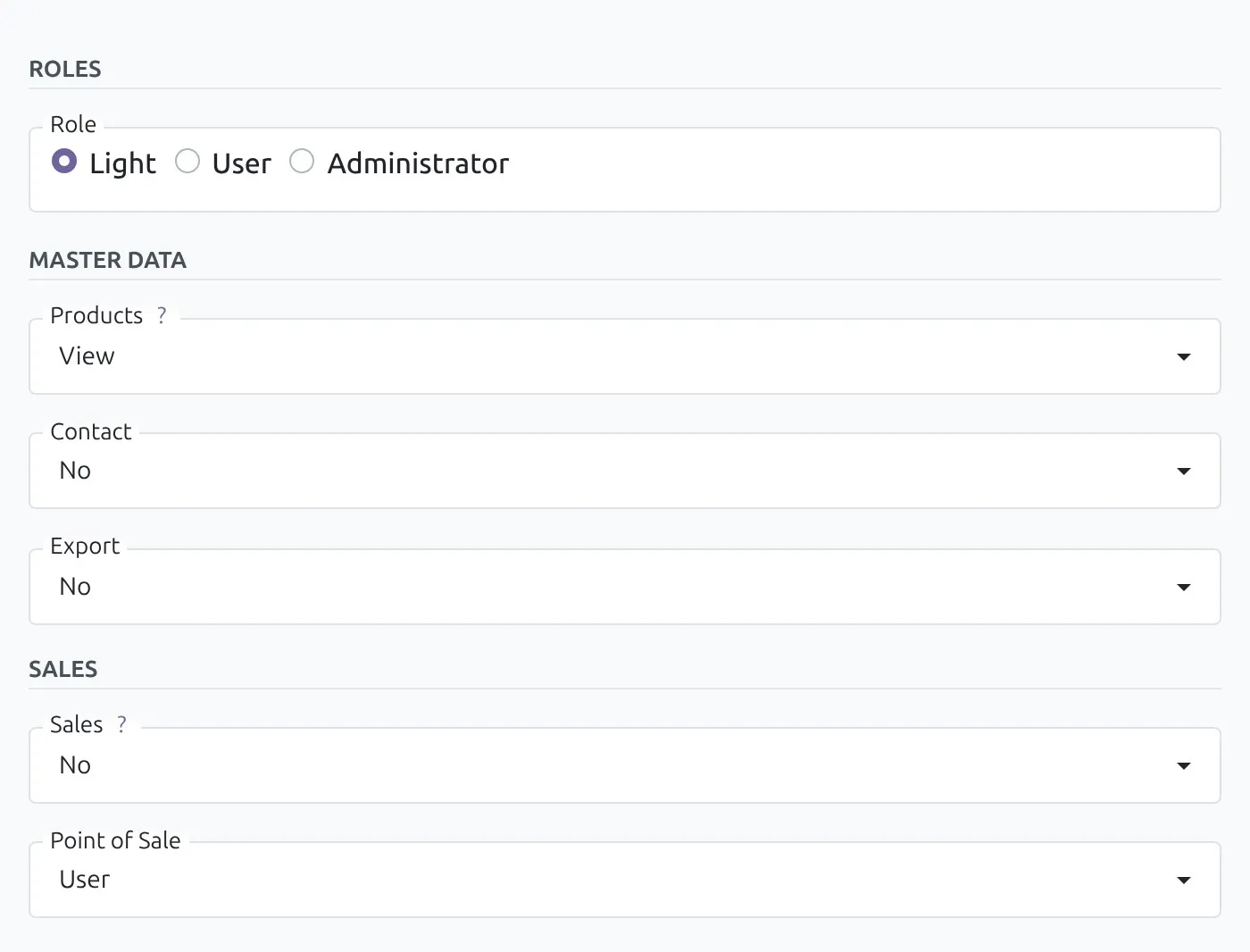
- Create a user. In our test database it started as Light.
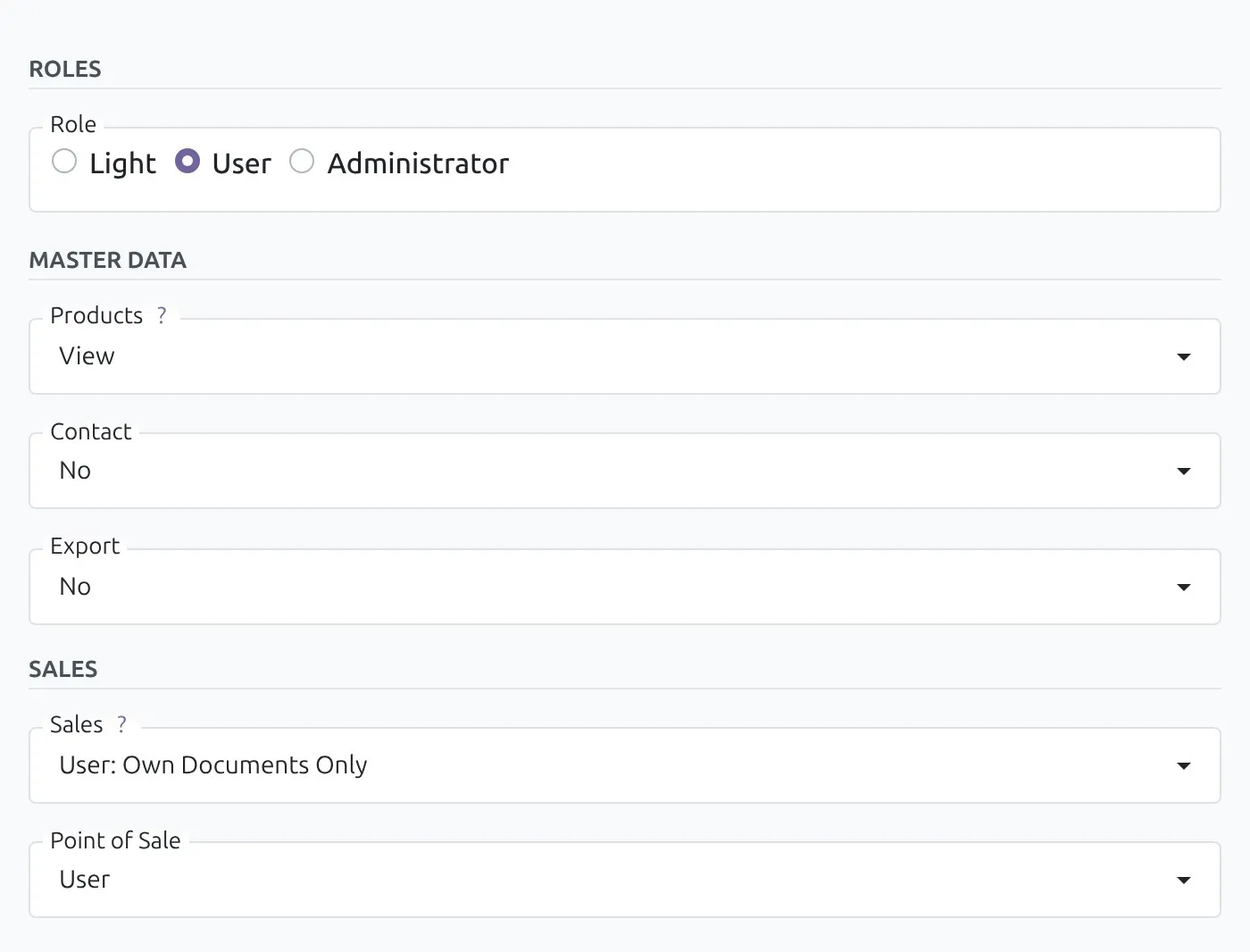
- Set Sales to “User: Own Documents Only”. The Role jumped to User by itself.
- Click Light again. Odoo stripped the rights that do not fit: Sales went back to No.
Sales is not a light right, so the account now needs a full User licence. On a subscription counted by role, that is the difference between two prices.
The catch
Employees without a login count too.
Odoo updated its Enterprise Agreement to version 13 on 23 September 2026, and the new definition reaches past user accounts into the Employees app.
Light User
“Where supported by the Customer’s version of the Software, any user account indicated as active and designated as a ‘Light User’ in the Software, or any active employee record (from the human resources App) not linked to an active non-portal user account.”
Odoo Enterprise Agreement, version 13, section 2
Standard charges are “based on the number of Users, Light Users and the Subscription Plan”.
The software collects the number of Users and Light Users to verify the subscription.
Odoo’s on-premise docs give 30 days to act when a database has more users than the subscription.
What to do this week
- Count your employee records in the Employees app that have no internal user linked.
- Archive the ones who have left. The definition counts active records only.
- Sort your users by role and move anyone who only needs their own time off, expenses, attendance, shifts, or till to Light.
- Check your subscription with your Odoo Advisor before your renewal, with both numbers in hand.
Set it up
How to make someone a Light User.
- 01
Open the user. Settings, Users & Companies, Users, then open the person or choose New.
- 02
Pick the role. On the Access Rights tab, under Roles, set Role to Light.
- 03
Give only light rights. Time Off, Attendances, Point of Sale, and similar. If Role jumps to User, a right you chose is not light.
- 04
Save and check. Reopen the user and confirm Role still reads Light.
Community databases have the same Role field. There it limits access, and it costs nothing, because Community has no user licence.
Plain answers
Light Users, answered.
What is a Light User in Odoo 20?
A Light User is a new, lower-priced kind of Odoo user for people who need Odoo for their own work rather than for running the business: time off, expenses, attendance, planning, point-of-sale shifts, warehouse scanning. In Odoo 20 every user form carries a Role with three choices, Light, User, and Administrator. Odoo’s pricing page calls the Light User “a cost-effective license”.
How much does an Odoo 20 Light User cost?
Odoo’s pricing page lists a Light User price well below a full user. Viewed from India on 24 September 2026, it showed “Light User at 195 Rs” next to Rs 580 to 950 per user per month for the Standard plan. Prices differ by country and billing period, and Odoo sells Light User licences through an Odoo Advisor with a customised quote rather than self-serve checkout.
What can a Light User do in Odoo 20?
According to Odoo’s pricing page: manage their own profile, leave requests, expense reports, referrals, appraisals, meal tracking, and attendance; view planning and manage worksheets; connect as an employee in a Point of Sale session; read the Knowledge app; and perform barcode scanning in the warehouse, without rights to create products or manage inventory.
What can’t a Light User do?
Odoo’s pricing page is explicit: no access to core operational business applications, naming Sales, Purchases, Projects, and Accounting, and no access to advanced features reserved for Standard or Custom users. Those people need a full User.
Do employees without a login count as Light Users?
Yes, under Odoo’s Enterprise Agreement version 13. Its definition of a Light User includes “any active employee record (from the human resources App) not linked to an active non-portal user account”, and Odoo’s pricing page describes a Light User as, among other things, an employee who exists solely as an HR record with no login. Archive the employee records of people who have left, and check your count with your Odoo contact.
How do I make someone a Light User in Odoo 20?
Open Settings, Users & Companies, Users, and open or create the user. On the Access Rights tab, the Roles section has a Role with three options: Light, User, and Administrator. Choose Light, then keep that user’s access rights within what Light allows. In our Odoo 20 test database, new users started as Light by default.
Why did my Light User turn into a regular User?
Because Odoo 20 works out the role from the user’s access rights. Give a Light user any right outside the light set, for example Sales set to “User: Own Documents Only”, and the Role switches to User on its own. Switching the Role back to Light removes the rights that do not fit, which in our test set Sales back to No.
Is the Light role in Odoo 20 Community?
Yes. The Role field with Light, User, and Administrator is part of Odoo 20’s base code, so Community databases show it too. It limits what the user can reach, but Community has no user licence to pay, so there the Light role is about access, not cost.
Can a Light User work in Inventory or Manufacturing?
Odoo’s pricing page limits warehouse work to barcode scanning without rights to create products or manage inventory. The Odoo 20 code is more generous: in Community, Inventory User and Manufacturing User are declared light, and in our test database a user with Inventory set to User stayed Light. Where the licence description and the software differ, confirm with your Odoo Advisor before relying on it.
Do Light Users count towards my Odoo Enterprise subscription?
Yes. Odoo’s Enterprise Agreement bases its standard charges on the number of Users, Light Users, and the subscription plan, and it lets the software collect the number of Users and Light Users to verify the subscription. Odoo’s on-premise documentation gives 30 days to act when a database has more users than the subscription covers.
More on Odoo 20
Moving to Odoo 20?
We read Odoo 20 the way this page reads the Light User: from the source, tested on a real server, with every claim dated. Start with the install, then the AI.
Spotted something that changed? Write to hello@nanti.ai and we update the page.